Sunday, 5 April 2015

How did you use media technologies in the construction and research, planning and evaluation stages?

I chose to present my research and planning (and my evaluation) in the form of a blog, and in order to do this I set up a blogger account and accounts for Soundcloud and Youtube so I would be able to upload sound files and videos regularly onto my blog to show my research.


Using a blog to display my research and planning has had many benefits - not only is it easier to organize and manage tasks, but it is more engaging for the reader and it is easier to support my research with examples of images, video clips, sound files and links. These were easy to upload and really enhance the look of the blog for the reader.


To film my teaser trailer I used a digital video camera (Panasonic HDC TM900) - it was easy to film this way with this camera as I could take a countless number of shots and it was easy to erase the shots I was not happy with.


In conjunction with the editing software I was able to upload my shots onto the system, arranging the shots in separate bins, giving me more time to edit.


As I found out in my research, taglines were a consistent convention of both posters and teaser trailers, and it was imperative to use them in my teaser trailer. To create my taglines I used photo shop. 


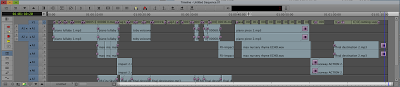
I began by uploading all my shots putting them in separate editing bins. This made it easy for me to access my shots when I needed them (as I had labelled each shot carefully). I had various other bins for music, sound effects, titles and captions. The benefits of organizing the editing this way was that it made editing the actual trailer much smoother - spending time organizing the material really paid off during the editing. Because I had created a shot list and storyboard I already had a running order, so the bins I had created allowed me to stick to it. To edit, I opened each shot and trimmed them and I went on to place each shot on the first layer of the time line. The multi track feature in the software allowed me to place all my shots onto one layer and all the other elements, like music and sound effects, and titles and captions on separate layers.


This allowed me to move different elements along the time line individually, so the mixing flowed much more seamlessly. The nine layers on the time line allowed me to add effects like audio and video fades (both essential components of teaser trailers)

When I decided on the music I wanted to use from Spotify I used the Adobe Audition software to cut down the tracks The digital technology in post production allowed me to be creative and utilize all the software to create a successful teaser trailer.


The extensive use of Photoshop was what allowed me to successfully create my poster and magazine cover. Photoshop allowed me to be creative and manipulate images altering colour schemes and fonts. I used a range of tools including the magnetic lasso (the tool I used to crop around images to isolate them), the eye dropper tool and the smudge tool.


Here are the various stages of my magazine front cover as I was creating it with photoshop:


I often used this tool to link various items together so that if I needed to change the layout I could move them all together. For example I linked the website, date, issue number, price and tagline together with the masthead. I also linked all the information in the red banner at the bottom of the cover together. This makes it easier to move items around, while keeping certain things together. 


I also used drop shadows on the majority of the words on my cover. This emphasises the words more, making them stand out. This especially helped in areas such as where the main cover line goes across the white shirt of the central image as giving the writing a black shadow in the background made the words stand out more and more recognisable. 


Here are the various stages of my poster while I was creating it on photoshop:


How effective is the combination of your main product and ancillary tasks?

With any marketing campaign it is important to keep a sense of continuity across all of the media products that are being used to promote the film - so that audiences realise that each text is advertising the same film. A unified campaign helps establish an awareness of the film, almost bombarding the potential audience with constant images associated with the film, so that when they make a choice about what to see at the cinema, the film will be fresh in the audience's minds.


Throughout my campaign I tried to make sure that there were many consistent, unifying elements.
The font used on my teaser trailer and poster, for example, are the same font, making them instantly recognisable as belonging to the same film. 


This means that when the audience are watching the teaser trailer and looking at the poster they can see that they belong to the same film. For the magazine cover, I did not use this font as it needed a completely different font, independent of the film. This is because magazines have their own house style, that is consistent from issue to issue - whilst the film companies may be able to influence which image appears on the front cover of a magazine, it is unlikely that they will persuade the magazine publishers to change the font that they use on their front cover.


I also used similar tagline's in my teaser trailer and on my poster. I couldn't use the exact same ones as the one in my teaser trailer is too long, but I did make sure that they were very similar and that they put across the same message. By having the similar tagline's on the teaser trailer and poster it becomes easy for the audience to associate them together, by sound as well as sight. The tagline doesn’t give away any extensive detail about the plot, but the small hint may make the audience curious and build anticipation. There is no tagline for the magazine cover, however if there was it would not be the same as the film, it would be something that relates to the magazine emphasizing that it is independent from the film. 


Although main central image used in the poster is not the same as the image I used on the magazine cover, they are both featuring the central protagonist/protagonists. As the same faces feature on both, they will be associated with each other.


I used the same credits/billing on my poster and my teaser trailer. I did not include billing in my magazine as it is not a convention of magazines - instead, they include cover lines related to features or reviews of forthcoming films. The same goes for production company logos which are featured on my trailer and poster but would not appear on the magazine cover. 


The date of release is the same on my poster and teaser trailer, linking them together.  The magazine’s date is January of 2015 (the month before the release of the film), tying in with the release of the film. Coverage of the film in the magazine will act as one final push for the audience, persuading them to go and see the film just ahead of its release.


Wednesday, 25 March 2015

List Of Other Ways My Film May Be Marketed

For my marketing campaign for my romantic comedy film, I created a poster, teaser trailer and magazine front cover. However, there would be many other ways that would also be used to market my film:

  • There would be a series of posters- including teaser posters and posters focusing on individual characters. For example here are the different posters for the film 'Knocked Up':


  • There would also be a series of trailers- a much longer theatrical trailer that would come out just ahead of the film coming out that included more narrative information. For example here are the different trailers for "The Hunger Games":


  • A soundtrack with accompanying music video's with images from the film and a featuring artist. For example the "Titanic" soundtrack and the "My Heart Will Go On" music video featuring Celine Dion:


  • A website that constantly updates information about the release of the film- will also feature audio and video clips. For example "The Hunger Games" website:


  • A Facebook page. For example "The Back-Up Plan":


  • Main character twitter accounts. For example Alan Garner from "The Hangover":


  • Merchandise. For example "Spiderman" 

  • Press kits that contain a selection of images, audio and information about the film, storyline, characters and actors that would get sent to media outlets so when they discuss the film they will be using images, information and audio that has come from the company marketing the film

  • Red carpet events such as a movie premier- this will also lead to a local media coverage reporting the event (few days before the films general release)

  • Chat show and radio show appearances for example Jonathan Ross or Alan Carr (just before the film comes out) 


List of Websites Used

Throughout my research I used many websites to help me with my research and planning:


  • Impawards- To find posters to analyse and then in particular romantic comedy posters


  • IMDB- To gather information about existing films and cast and crew from my particular genre


  • Youtube- To watch existing trailers and listen to potential music for my trailer 


  • Dafont- To find a font for my poster, magazine front cover and teaser trailer (in particular my poster) 


  • Wikipedia- to find information about film magazines, target audiences and romantic comedies 


  • filmsite.org- to look at information about different genres


Software and Hardware Used

When creating my marketing campaign I used many different forms of hardware and software to help me create my poster, teaser trailer and magazine front cover, and also for my research and planning:

  • Blogger- used as a diary for all my research and planning tasks 


  •  Soundcloud- to store audio files and sound effects used


  • Spotify- to create a playlist of potential songs for my teaser trailer


  • Photoshop- for analysing existing magazines and posters and then creating my own


  • Adobe Audition 1.5- for recording and editing any audio for my teaser trailer- I was familiar with using this from my AS coursework 


  • Avid Media Composer- this is a video editing software that I used to edit my trailer 


  • Video Camera (Panasonic HDC TM900)- to record my teaser trailer

  • Iphoto- to organise the photos I took 


  • Digital Camera- to take photos of possible locations and shots of actors for my poster and magazine front cover